NTWind News
This is a news blog about software published on NTWind website. You can subscribe to the NTWind News by email or RSS to stay up-to-date with our products and services.
Alt-Tab Terminator v3.5 - Multi-Monitor Fixes
Changelog for Alt-Tab Terminator v3.5:
- Fixed desktop and taskbar previews on multi-monitor systems
- Fixed occasional flickering when cycling between tasks quickly
Download Alt-Tab Terminator (32-bit and 64-bit)
Posted by Alexander Avdonin on 16-Aug-18 07:51
WinCam v1.4 - Maintenance Release
Changelog for WinCam v1.4 (July 12, 2018):
- New languages: Chinese Simplified, Slovenian
- Fixed an issue with icon scaling on high DPI
- Some other minor improvements and bug fixes
Download WinCam (32-bit and 64-bit)
Posted by Alexander Avdonin on 12-Jul-18 10:46
Alt-Tab Terminator v3.4 - Performance Improvements
Changelog for Alt-Tab Terminator v3.4:
- New languages: Chinese (Traditional), Italian - fixed
- Fixed some hang ups and improved Alt-Tab response time
- Fixed an issue with crashing ATT when closing some apps
Download Alt-Tab Terminator (32-bit and 64-bit)
Posted by Alexander Avdonin on 04-Jul-18 14:08
Alt-Tab Terminator v3.3 - Maintenance Release
Changelog for Alt-Tab Terminator v3.3:
- New languages: Italian, Japanese, Portuguese (Brazil)
- Fixed an issue with opening ATT on system restart
Download Alt-Tab Terminator (32-bit and 64-bit)
Posted by Alexander Avdonin on 16-Jun-18 08:27
CloseAll v3.1 - Maintenance Release
CloseAll is a freeware utility that allows you to close or terminate all open applications at once. New version 3.1 introduces a slightly improved UI:
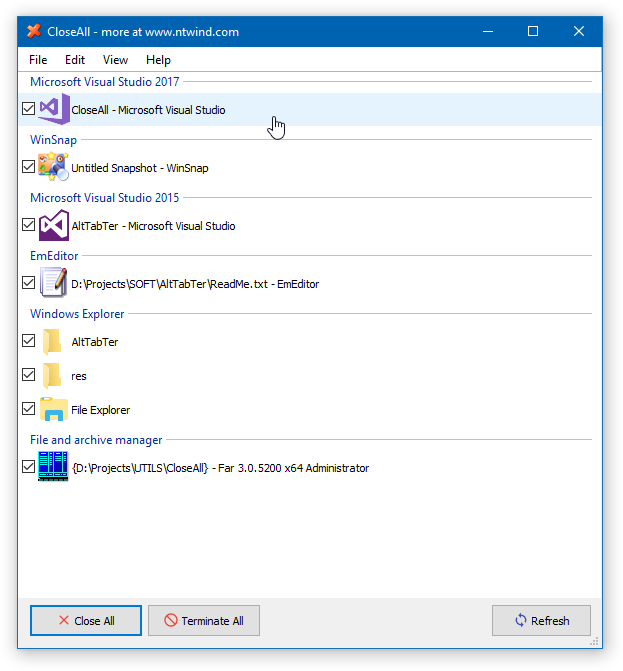
Changelog for CloseAll v3.1 (June 15, 2018):
- Added icons for Close, Terminate and Refresh buttons
- Improved window enumeration algorithm
- Some other minor improvements and bugfixes
Download CloseAll (32-bit and 64-bit)
Posted by Alexander Avdonin on 15-Jun-18 13:03
Alt-Tab Terminator v3.2 – New Languages
Changelog for Alt-Tab Terminator v3.2:
- New languages: Chinese (Simplified), Dutch, French, German
Download Alt-Tab Terminator (32-bit and 64-bit)
Posted by Alexander Avdonin on 15-Jun-18 07:50
Alt-Tab Terminator v3.1 - Multilingual User Interface
Alt-Tab Terminator is ready for translations, changelog for v3.1:
- Added support for language files (see lang\_Translation.txt)
- Improved task list enumeration algorithm
- Fixed an issue with the Menu/App key
- Tooltips for Close, Terminate and Run buttons
- Some other minor improvements and bug fixes
Download Alt-Tab Terminator (32-bit and 64-bit)
Posted by Alexander Avdonin on 12-Jun-18 17:04
Alt-Tab Terminator – Brand New Task Switcher
Alt-Tab Terminator is the direct successor to VistaSwitcher and TaskSwitchXP. Unlike to the standard Alt-Tab, it shows a live desktop preview of the selected application and an easy-to-read relevant list of tasks with titled icons so you can find the one you need immediately at a glance.
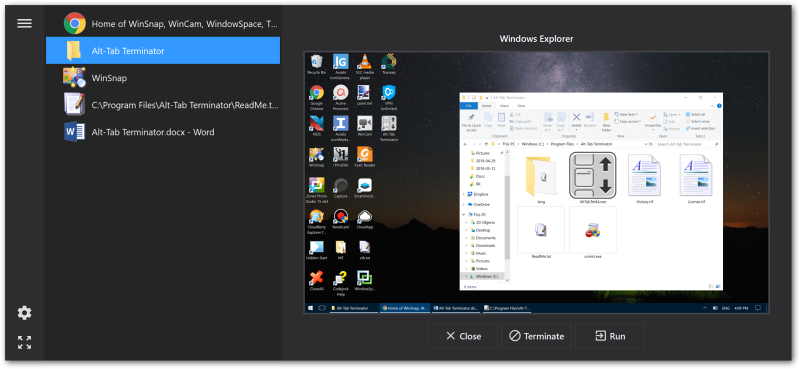
Task Preview: Visualization is the key point. Alt-Tab Terminator shows you the exact live desktop preview of the application you want to switch to, even if it has multiple child windows.
Quick & Easy Navigation: Navigate through the task list with the keyboard (Tab, Arrow Keys, Home, End, etc.) or the mouse – simply place the mouse pointer over a task or use the mouse wheel.
Clear Large Labels: Multiple window titles are arranged on a vertical task list; a large icon is placed by each one of them. Finding the right window has become much quicker.
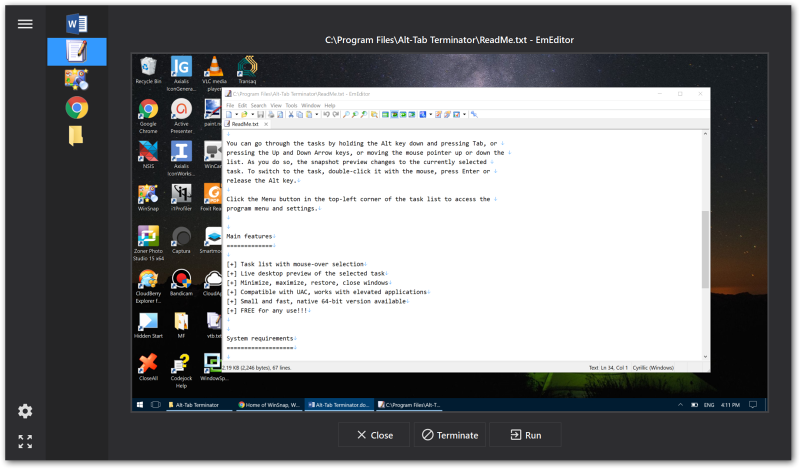
Alt-Tab Terminator works with 32-bit and 64-bit applications, even if you run them with administrative privileges. It also supports high DPI and modern Metro apps on Windows 10.
Download Alt-Tab Terminator (32-bit and 64-bit)
Posted by Alexander Avdonin on 23-May-18 04:00
WinSnap v4.6.4 - Maintenance Release
Changelog for WinSnap v4.6.4 (April 24, 2018):
- Fixed object selection on Windows 10 with the latest updates
- Some other minor improvements and bug fixes
Download WinSnap (32-bit and 64-bit)
Posted by Alexander Avdonin on 24-Apr-18 08:21
CloseAll v3.0 - /NOUI and /TERMINATE Switches
CloseAll is a small enhancement utility that flashes a ‘close’ signal to all open applications and then ceases. It doesn’t use any system resources and unloads right after completing its task. Starting from v3.0, you can specify /NOUI and /TERMINATE command line switches to run CloseAll.exe in silent mode.
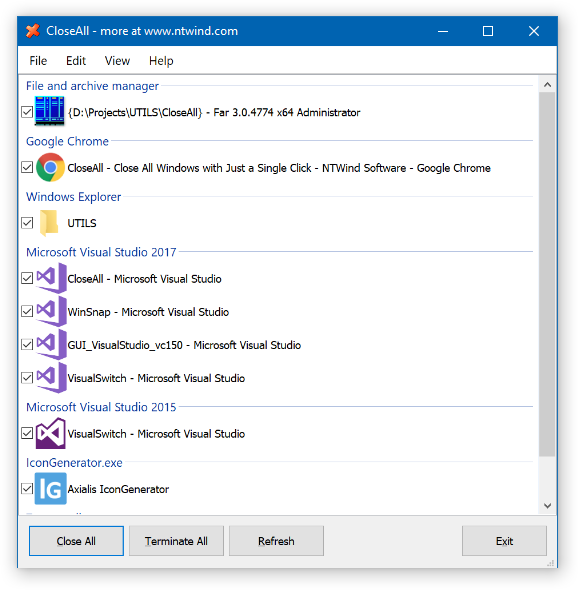
Changelog for CloseAll v3.0 (April 23, 2018):
- Command line switches: /NOUI and /TERMINATE
- Added ability to terminate all applications
- Added "Close All", "Terminate All" and Refresh buttons
- Some other minor UI changes and improvements
Download CloseAll (32-bit and 64-bit)
Posted by Alexander Avdonin on 23-Apr-18 10:12
Showing 251 - 260 of 385 Articles | Page 26 of 39
Home • News