Media Remote - Control Playback, Volume, Open YouTube and Videos from Your Couch
Media Remote turns your phone or tablet into a comfortable remote control for media playing on a Mac and Windows computer. Pair your trusted devices once, then use your local network or
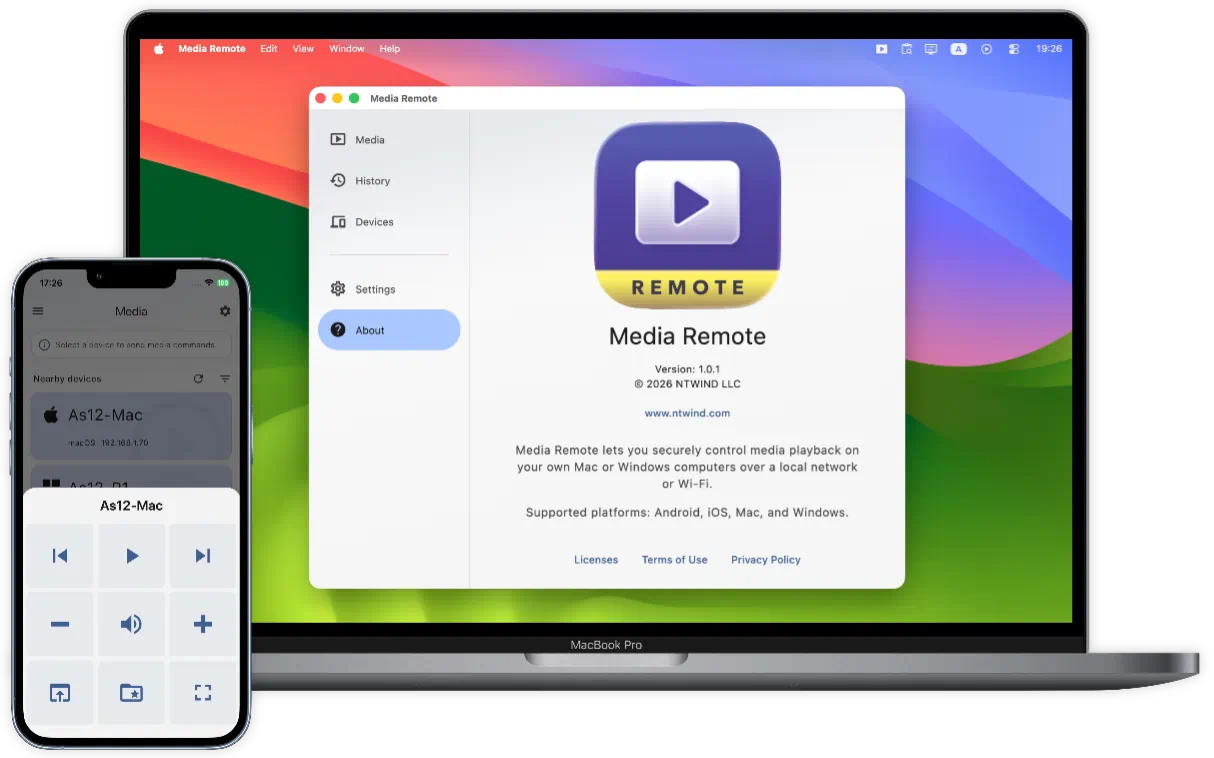
Media Remote is designed for relaxed entertainment. Use it when your computer is connected to a TV, projector, large monitor, or speakers and you do not want to get up just to pause a movie, lower the volume, mute an ad break, skip a track, open a YouTube video, or put a browser video into full screen.


To start using Media Remote, install it on two or more devices. Media receiver features are available on Mac and Windows computers only. Use Android, iPhone or iPad as the remote. Version 1.0.3 was released on 07-Sep-2026, see what's new →


Languages: Arabic, Czech, German, Greek, English, Spanish, Finnish, French, Indonesian, Italian, Japanese, Korean, Dutch, Polish, Portuguese, Romanian, Russian, Swedish, Turkish, Ukrainian, Chinese Simplified, Chinese Traditional
ENJOY OUR FREE SOFTWARE - No ads, no subscriptions, completely free!
Key Features
- Playback Control from Anywhere Nearby: Send Play / Pause, Next, Previous, Full screen, and other everyday media commands from your phone, tablet, laptop, or another computer.
- Volume and Mute in One Tap: Raise or lower system volume, mute instantly, or unmute when the quiet moment is over. It is perfect for movies, music, video calls, online classes, and late-night viewing.
- Open YouTube and Online Videos: Paste or enter an http or https link on your remote device and open it on a paired computer. Use it for YouTube, streaming pages, music sites, tutorials, lessons, and other online media.
- Open Local Media Files: Choose media folders on your Mac or Windows computer, then browse and open available video or audio files from a paired remote device. Common formats such as MP4, MKV, MOV, WebM, MP3, FLAC, WAV, and M4A are supported by default.
- Works with Many Players: Media Remote uses system media controls, so it works with many desktop media players and browser-based platforms that respond to standard media keys.
- Local Network Only: Media Remote is designed for nearby control on your own network. No cloud account is required, and commands do not need to travel through an online service.
- Secure Pairing: Devices must be paired before they can send commands. Pair only devices you own and trust, then decide which media permissions each paired device may use.
- Per-Device Permissions: Allow playback control but block file opening, allow volume only, or turn off URL opening for a shared phone or family tablet. Each trusted device can have its own rules.
- Nearby Device Discovery: Media Remote can find supported Mac and Windows computers on your network automatically. If discovery is blocked, you can add a device manually by local IP address.
- Command History: Review recent actions, see whether a command was performed, ignored, or failed, and repeat useful actions such as opening a favorite video link.
- Cross-Platform Remote: Use Android, iPhone, iPad, Mac, or Windows as the remote. Mac and Windows computers can act as media receivers.
- Comfortable Everyday UI: Light and dark themes, accent colors, device filters, hidden devices, background tray behavior, autostart, and history settings help Media Remote fit into your living room setup.


👆 Screenshots on Mobile — Click to Enlarge
User Interface Design
The UI of Media Remote is organized into three main tabs, each focused on a simple entertainment task:
- Media Tab: This is the main control center. It shows nearby and paired Mac or Windows devices. Tap a computer to open the control sheet, then pause, play, skip, mute, adjust volume, enter full screen, open a URL, or choose a media file.
- History Tab: This tab keeps a simple record of recent media commands, including the action, device, direction, time, result, and failure reason when something could not be completed. You can repeat previous actions or clear the list.
- Devices Tab: This section helps you manage trusted devices. Rename them, edit permissions, hide devices you do not want on the Media tab, remove old pairings, or add a device by local IP address.
Media Remote is a practical living-room companion for anyone who watches videos, listens to music, or uses a computer as a home entertainment screen. It keeps the controls you need close at hand, without forcing you into a special player, cloud account, or complicated smart-home setup.
Getting Started | What's New | Privacy Policy | Terms of Use
Home • Remote Tools • Media Remote