NTWind News
This is a news blog about software published on NTWind website. You can subscribe to the NTWind News by email or RSS to stay up-to-date with our products and services.
WinSnap v5.2.5 - Maintenance Release
Changelog for WinSnap v5.2.5 (April 20, 2020):
- Updated language: Arabic
- Fixed auto-copy when using Region capture at startup
- Fixed loading language for Region capture mode
- Some other minor improvements and bug fixes
Download WinSnap (32-bit and 64-bit)
Posted by Alexander Avdonin on 20-Apr-20 13:00
Alt-Tab Terminator v4.7 - DisplayFusion Compatibility
Changelog for Alt-Tab Terminator v4.7 (April 18, 2020):
- Fixed an issue with minimized UWP icons
- Fixed an issue with UWP apps and virtual desktops
- Fixed a compatibility issue with DisplayFusion
- Some other minor improvements and bug fixes
Download Alt-Tab Terminator (32-bit and 64-bit)
Posted by Alexander Avdonin on 18-Apr-20 07:38
Close All Windows v4.8 - Maintenance Release
Changelog for CloseAll v4.8 (April 18, 2020):
- Fixed an issue with minimized UWP icons
- Fixed an issue with UWP apps and virtual desktops
- Some other minor improvements and bug fixes
Download CloseAll (32-bit and 64-bit)
Posted by Alexander Avdonin on 18-Apr-20 07:35
Alt-Tab Terminator v4.6 - UWP Icons and Bug Fixes
Alt-Tab Terminator displays UWP/Metro application icons now:
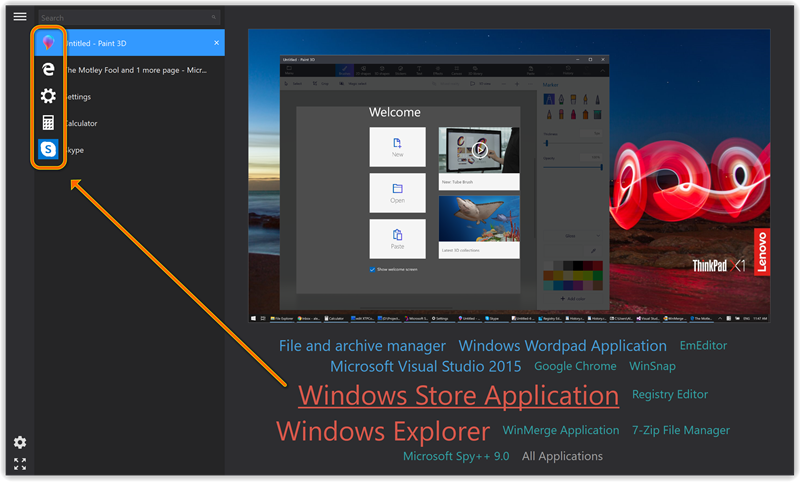
There is no public API to do it, so I had to write my own parser of manifest files to implement this feature.
Changelog for Alt-Tab Terminator v4.6 (April 11, 2020):
- New language: Spanish
- Added icon handling for UWP/Metro applications
- Improved resizing algorithm for masked icons
- Fixed F4-F9 keyboard shortcuts in search mode
- Some other minor improvements and bug fixes
Download Alt-Tab Terminator (32-bit and 64-bit)
Posted by Alexander Avdonin on 11-Apr-20 09:43
Close All Windows v4.7 - UWP Application Icons
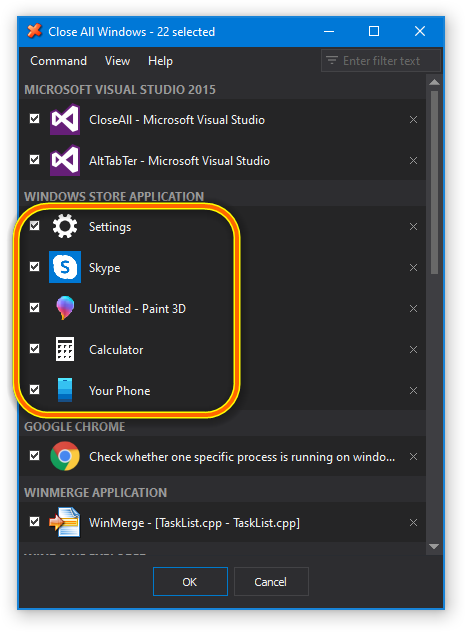
Finally, CloseAll can handle UWP application icons. Sometimes icons are different from what Windows Explorer uses, but it looks much better now:
Changelog for CloseAll v4.7 (April 10, 2020):
- Added icon handling for UWP/Metro applications
- Improved resizing algorithm for masked icons
- Fixed another compatibility issue with DisplayFusion
- Some other minor improvements and bug fixes
Download CloseAll (32-bit and 64-bit)
Posted by Alexander Avdonin on 10-Apr-20 12:20
WinSnap 5.2.4 - SHA256 Digital Signature
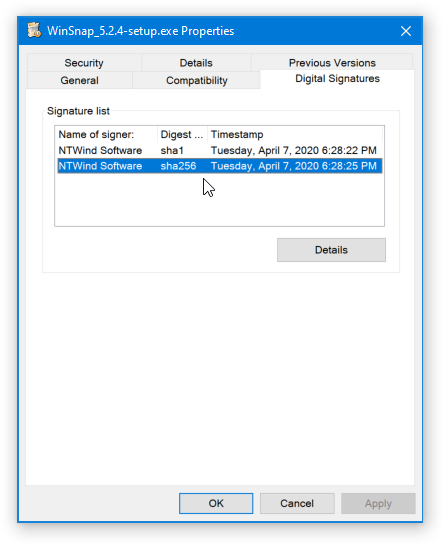
I signed the setup program and all executables with my renewed SHA256 certificate in addition to SHA1:
If you still see the following SmartScreen warning, please click "Run anyway":
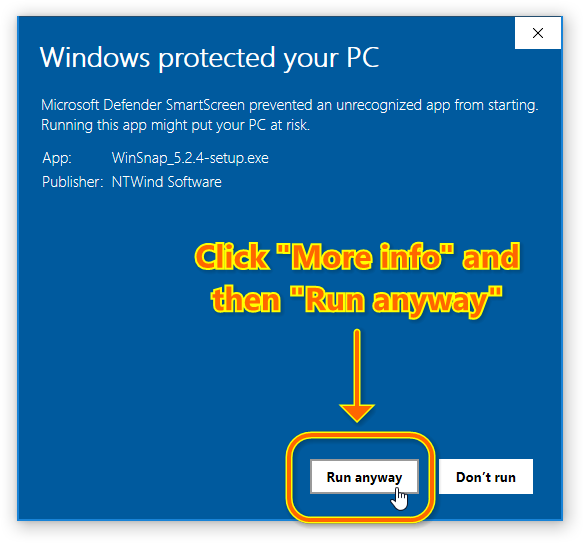
The more people click "Run anyway", the faster it'll disappear. It's hard to understand why there is no way to transfer SmartScreen reputation to a new certificate. It looks like Microsoft is trying to force small ISVs out of business by implementing bogus security features.
Changelog for WinSnap v5.2.4 (April 7, 2020):
- Executables signed with both SHA1 and SHA256 certificates
- Some other minor improvements and bug fixes
Download WinSnap (32-bit and 64-bit)
Posted by Alexander Avdonin on 07-Apr-20 16:26
Visual Subst v3.4 - Spanish and Farsi Languages
Changelog for Visual Subst v3.4 (April 6, 2020):
- New languages: Farsi, Spanish
- Updated digital signature for executable files
- Some other minor bug fixes and improvements
Download Visual Subst (32-bit and 64-bit)
Posted by Alexander Avdonin on 06-Apr-20 17:44
Close All Windows v4.6 - Compatibility with DisplayFusion
Changelog for CloseAll v4.6 (April 6, 2020):
- Fixed a compatibility issue with DisplayFusion
- Some other minor improvements and bug fixes
Download CloseAll (32-bit and 64-bit)
Posted by Alexander Avdonin on 06-Apr-20 17:41
Alt-Tab Terminator v4.5 - Maintenance Release
Changelog for Alt-Tab Terminator v4.5 (April 6, 2020):
- Menu/App key opens the task menu now
- Removed "format C" joke from about console
- Updated digital signature for executable files
- Some other minor improvements and bug fixes
Download Alt-Tab Terminator (32-bit and 64-bit)
Posted by Alexander Avdonin on 06-Apr-20 17:37
Hidden Start v4.9 - Set Environment Variables
Changelog for Hidden Start v4.9 (April 6, 2020):
- Added /ENV=VARNAME=VALUE to set environment variables
- Updated digital signature for executable files
- Some other minor improvements and bug fixes
Download Hidden Start (32-bit and 64-bit)
Posted by Alexander Avdonin on 06-Apr-20 17:34
Showing 181 - 190 of 385 Articles | Page 19 of 39
Home • News