NTWind News
This is a news blog about software published on NTWind website. You can subscribe to the NTWind News by email or RSS to stay up-to-date with our products and services.
Visual Subst v2.2 - Drive Change Notifications
Visual Subst v2.2 (June 6, 2019) changelog:
- Added drive change notifications for Windows Explorer
- Improved creation and synchronization of elevated drives
- Fixed empty label text when pressing Save button
- Some other minor bugfixes and improvements
Download Visual Subst (32-bit and 64-bit)
Posted by Alexander Avdonin on 06-Jun-19 18:43
WinSnap v5.1.2 - Maintenance Release
Changelog for WinSnap v5.1.2 (June 6, 2019):
- Updated languages: Dutch, Spanish
- Some other minor improvements and bug fixes
Download WinSnap (32-bit and 64-bit)
Posted by Alexander Avdonin on 06-Jun-19 09:21
Alt-Tab Terminator v3.9 - Maintenance Release
Changelog for Alt-Tab Terminator v3.9 (April 28, 2019):
- Fixed saving language option after restart
- Some other minor improvements and bug fixes
Download Alt-Tab Terminator (32-bit and 64-bit)
Posted by Alexander Avdonin on 28-Apr-19 15:00
WinSnap v5.1.1 - Updated Languages
Changelog for WinSnap v5.1.1 (April 28, 2019):
- Updated languages: Chinese, Danish, Farsi, Hungarian, Slovenian, Ukrainian
- Some other minor improvements and bug fixes
Download WinSnap (32-bit and 64-bit)
Posted by Alexander Avdonin on 28-Apr-19 14:57
WinSnap v5.1.0 - Flat Style and Delay Menu
A new version of WinSnap has been released today. It adds the dropdown menu to set up delay without opening the settings dialog and contains several other UI enhancements.
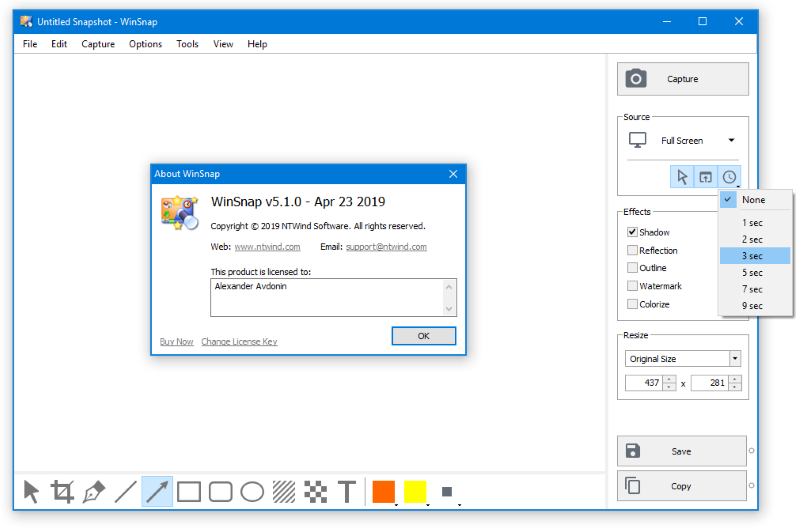
Changelog for WinSnap v5.1.0 (April 23, 2019):
- Added dropdown menu to set up delay before capture
- Auto-Save and Auto-Copy buttons were slightly changed
- Added new Flat theme (visible only in English version now)
- Rearranged View menu(visible only in English version now)
- Several changes to language files (see _Translation.txt)
- Fixed text alignment on the capture mode button
- Some other minor improvements and bug fixes
Download WinSnap (32-bit and 64-bit)
Posted by Alexander Avdonin on 23-Apr-19 14:02
Visual Subst v2.1 - Maintenance Release
Visual Subst v2.1 (April 22, 2019) changelog:
- Added /? or /HELP command line switch
- Some minor bug fixes and improvements
Download Visual Subst (32-bit and 64-bit)
Posted by Alexander Avdonin on 22-Apr-19 09:08
WinSnap v5.0.8 - Maintenance Release
Changelog for WinSnap v5.0.8 (April 3, 2019):
- Updated language files: Turkish
- Improved capture of windows with transparency
- Faster algorithm to clear native shadows
Download WinSnap (32-bit and 64-bit)
Posted by Alexander Avdonin on 03-Apr-19 06:19
Visual Subst v2.0 - Elevated Drives, Labels and More
Visual Subst solves three main issues with the built-in 'subst' command: it seamlessly creates drives for elevated applications, adds editable drive labels and restores drives after reboots. Also, Visual Subst makes it easier to create, edit and remove virtual drives in a GUI way.
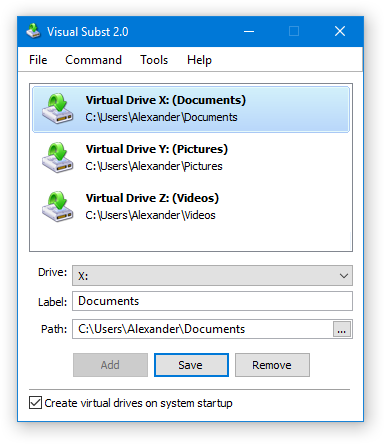
- UAC and elevated applications: Visual Subst seamlessly creates virtual drives for elevated applications duplicating the drives created for the standard user. It bypasses UAC prompts using the same technique as Hidden Start with /NOUAC switch making no distraction to the user.
- Virtual drive labels: Drive labels are useful if you often use Windows Explorer. Visual Subst allows you to define and edit virtual drive labels easily.
- Restoring drives after restart: Visual Subst saves the list of virtual drives and loads it on the system startup. No additional action required – just make sure that “Create virtual drives on system startup” option is enabled.
Download Visual Subst (32-bit and 64-bit)
Posted by Alexander Avdonin on 22-Mar-19 20:31
WinSnap v5.0.7 - Overall Stability Improvements
Changelog for WinSnap v5.0.7 (February 6, 2019):
- Tray icon is now restored after Explorer restart
- Fixed crash when double-clicking new text object
- Fixed combo box text spacing on high DPI
- Some other minor improvements and bug fixes
Download WinSnap (32-bit and 64-bit)
Posted by Alexander Avdonin on 06-Feb-19 07:37
Hidden Start v4.6 - Improved GUI Tool
Hidden Start (or Hstart) is a lightweight command line utility which allows you to hide console window and UAC elevation prompt, run multiple commands synchronously and much more.
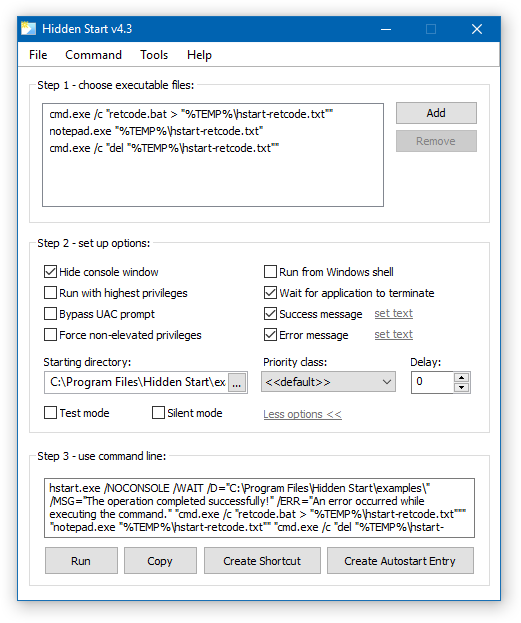
Changelog for Hidden Start v4.6 (February 4, 2019):
- Added tooltips to command line options in Hstart GUI Tool
- Fixed a few minor issues with high DPI screens
- Several stability and performance improvements
Download Hidden Start (32-bit and 64-bit)
Posted by Alexander Avdonin on 04-Feb-19 11:23
Showing 231 - 240 of 385 Articles | Page 24 of 39
Home • News