What's New in WinSnap
Below is the list of the latest news and blog posts on WinSnap. You can subscribe to the NTWind News by email or RSS to stay up-to-date with our products and services.
WinSnap v6.1.2 - Square Icon Buttons & Polish Translation
Changelog for WinSnap v6.1.2 (January 27, 2024):
- New language: Polish
- Updated language: Italian
- Fixed square shape of icon buttons on Screenshot pane
- Some other minor improvements and bug fixes
Download WinSnap (32-bit and 64-bit)
Posted by Alexander Avdonin on 27-Jan-24 05:15
WinSnap v6.1.1 - New Languages and Improved Installer
Changelog for WinSnap v6.1.1 (October 1, 2023):
- New language: Finnish
- Updated language: Spanish
- Installer runs app non-elevated easier and faster
- Some other minor improvements and bug fixes
Download WinSnap (32-bit and 64-bit)
Posted by Alexander Avdonin on 01-Oct-23 14:29
WinSnap v6.1.0 - Arabic Translation and New Signature
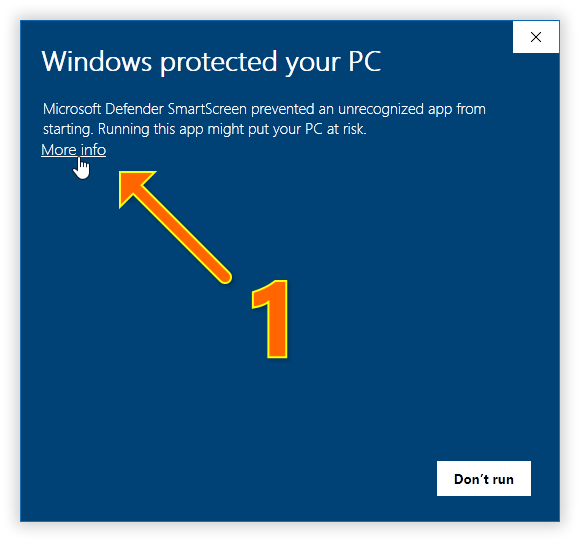
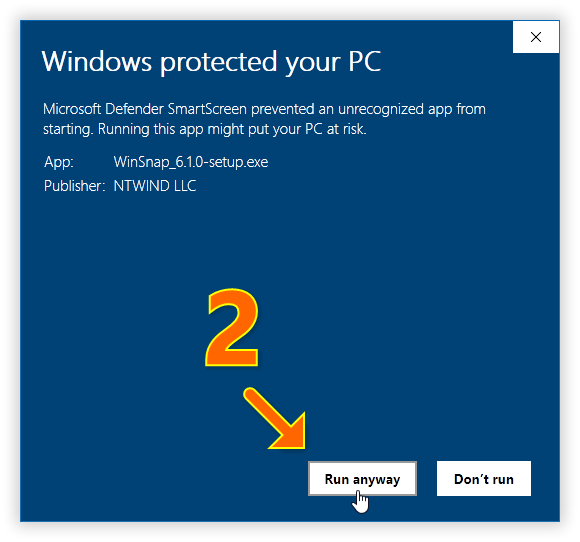
If you see the following SmartScreen warnings, please click (1) More Info and then (2) Run Anyway:
Changelog for WinSnap v6.1.0 (September 12, 2023):
- New languages: Arabic
- Updated languages: French
- New digital signature for executable files
- Fixed shape of Auto-Save/Copy marks on some DPI
- Some other minor improvements and bug fixes
Download WinSnap (32-bit and 64-bit)
Posted by Alexander Avdonin on 12-Sep-23 19:18
WinSnap v6.0.9 - Maintenance Release
Changelog for WinSnap v6.0.9 (June 29, 2023):
- Updated languages: Portuguese (Brazil), Slovenian, Turkish
- Changed URL redirection for update checks
- Some other minor improvements and bug fixes
Download WinSnap (32-bit and 64-bit)
Posted by Alexander Avdonin on 29-Jun-23 09:25
WinSnap v6.0.8 - Maintenance Release
Changelog for WinSnap v6.0.8 (May 12, 2023):
- Updated languages: Italian, Korean, PortugueseBR, Slovenian
- Fixed an issue with Firefox window capture on Windows 11
- Fixed an issue with native shadow option and language switching
- Some other minor improvements and bug fixes
Download WinSnap (32-bit and 64-bit)
Posted by Alexander Avdonin on 12-May-23 05:49
WinSnap v6.0.7 - Chinese Traditional and Bug Fixes
Changelog for WinSnap v6.0.7 (May 7, 2023):
- New language: Chinese (Traditional)
- Updated languages: Bulgarian, Dutch, PortugueseBR, Spanish
- Fixed overlapped position of menu buttons with 100% DPI
- Fixed saving/restoring of extended capture modes from "dot" menus
- Fixed window restore on capture when WinSnap is maximized
- Fixed background window activation for UWP applications
- 64-bit executables are installed by default on ARM64 now
- Renamed 'System' theme to 'Classic', 'Custom Frame' to 'Frame Theme'
- Some other minor improvements and bug fixes
Download WinSnap (32-bit and 64-bit)
Posted by Alexander Avdonin on 07-May-23 09:06
WinSnap v6.0.6 - Polished & Rearranged Language Menu
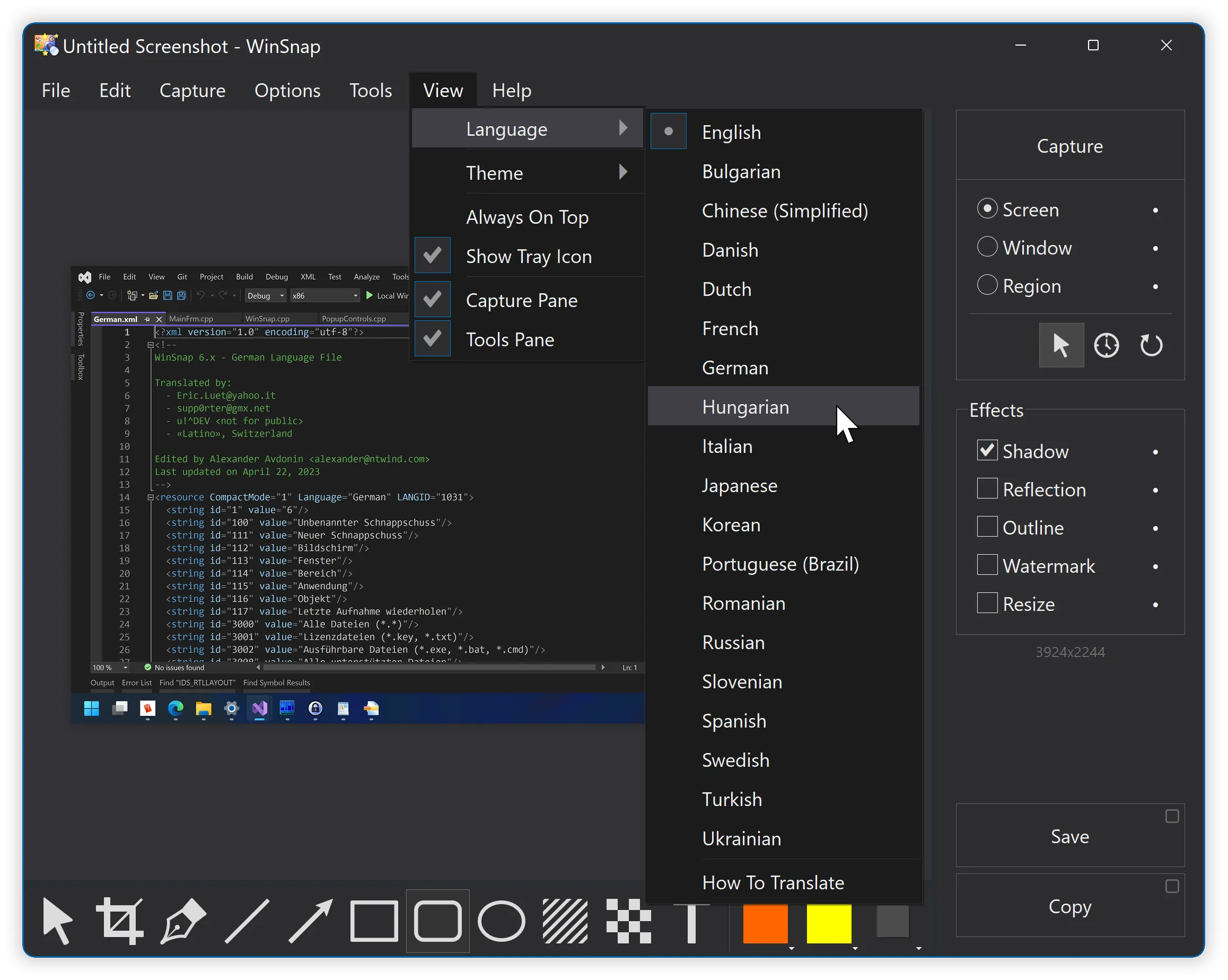
If you find any typos in translations, please let me know. Updated Language menu:
Changelog for WinSnap v6.0.6 (April 22, 2023):
- New languages: Bulgarian, Romanian, Swedish, Turkish
- Updated languages: German, Korean, Slovenian, Ukrainian
- Language menu is polished and rearranged, duplicates removed
- "Lang" folder is cleared by setup to update the file names
- Fixed image size disappearance on language change
- Fixed a random icon scaling issue on language change
- Fixed watermark text outline with white color
- Some other minor improvements and bug fixes
Download WinSnap (32-bit and 64-bit)
Posted by Alexander Avdonin on 22-Apr-23 11:41
WinSnap v6.0.5 - Updated Language Files
Changelog for WinSnap v6.0.5 (April 12, 2023):
- New language file: Hungarian
- Updated language files: German, Portuguese (Brazil), Slovenian
- Some other minor improvements and bug fixes
Download WinSnap (32-bit and 64-bit)
Posted by Alexander Avdonin on 12-Apr-23 11:32
WinSnap v6.0.4 - Four New Languages and Fixes
Changelog for WinSnap v6.0.4 (April 2, 2023):
- New language files: Italian, Japanese, Portuguese-BR, Slovenian
- Updated language files: Danish, Dutch, Spanish, Ukrainian
- Fixed some non-translated controls in the About dialog
- Fixed an issue with installer wiping out the "lang" subfolder
- Some other minor improvements and bug fixes
Download WinSnap (32-bit and 64-bit)
Posted by Alexander Avdonin on 02-Apr-23 17:23
WinSnap v6.0.3 - Five New Translations and Fixes
Changelog for WinSnap v6.0.3 (March 31, 2023):
- New language files: Chinese, Danish, Dutch, Spanish, Ukrainian
- Updated language files: German, Korean
- Fixed tooltip to show the correct option (Include Shadow -> Native Shadow)
- Some other minor improvements and bug fixes
Download WinSnap (32-bit and 64-bit)
Posted by Alexander Avdonin on 31-Mar-23 12:31