Organize Your Workspace on Large Screens for More Comfort with WindowSpace
WindowSpace is a powerful desktop enhancement utility for large monitors, widescreens and multi-monitor systems. Too many open windows make the desktop messy! It affects your productivity as very soon you’ll find yourself hunting for windows, rather than doing the job. This is where WindowSpace can extend a helping hand.
WindowSpace_2.6.3-setup.exe (0.5 MB)
Updated on 13-Oct-2020, see what's new →
$19.95 or less, lifetime license
FREE updates for life, NOT a subscription!
Once installed, it allows you to manipulate windows in many new amazing ways: snap windows to each other and to the screen edges, maximize them vertically or horizontally, pin on top of the other windows, hide from view, minimize to tray, and it’s just the beginning!
Snap Windows to the Screen Edges & Other Windows
Multitasking has never been easy! Windows overlap each other, hang partway out of sight so that you may even forget that an application is running. WindowSpace makes windows snap to each other and to the screen borders neatly, edge to edge, rather than block or cover one another completely. Snapping is an excellent way to keep your desktop organized.
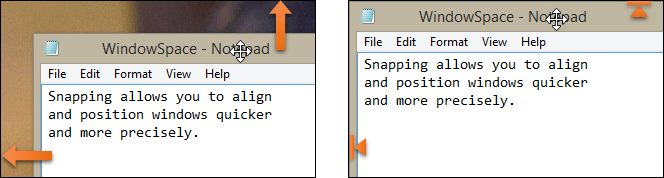
1. Drag the titlebar to move a window |
2. Snap window to the screen edges |
With WindowSpace, you can align windows at once without having to reposition them constantly on the desktop, or hunt for the application you need behind other windows. When you resize a window, snapping allows you to quickly make two or more windows the same width or height.
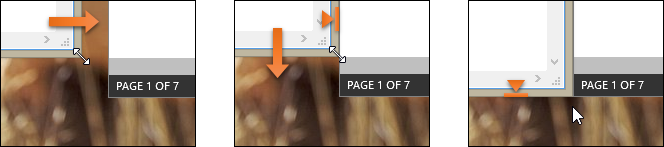
1. Drag the edges to resize |
2. Snap to other window |
3. Align the bottom edges |
Using this feature you can easily line up misplaced windows to clear up more desktop space. It’ll take you less than a second to set any window to its desired position, and make good use of every single pixel of your workspace.
Snap-To-Side – Similar to Aero Snap in Windows 7/8/10
The Snap-To-Side feature lets you expand and maximize windows by dragging them to different edges of the screen. To trigger one of these actions, touch the corresponding edge of the screen with the mouse cursor while moving a window.
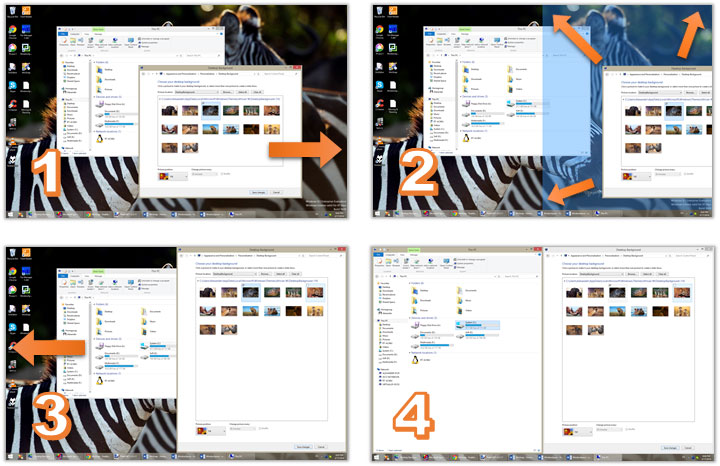
Resizing to the edge & maximize vertically:
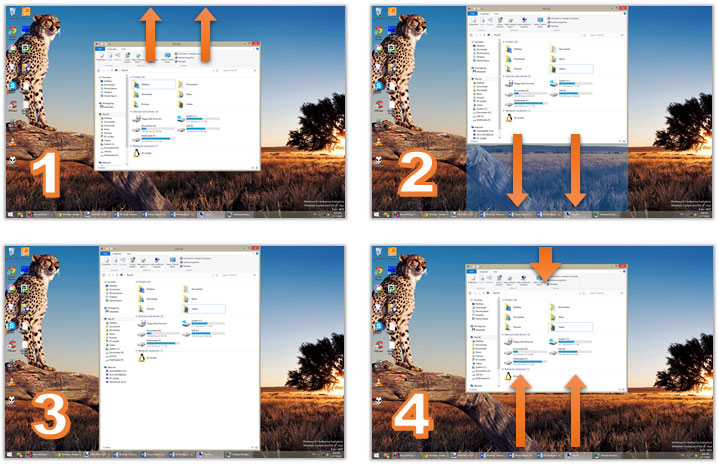
To maximize a window vertically, press the default key combination – Alt+F5, or right-click the Maximize title button. Unsnapping window from the screen edge restores its original size. This feature also works for “child” windows which are maximized inside their MDI parent.
Snap-To-Corners – Better than Aero Snap in 7/8/10
The built-in Windows Aero Snap and WindowSpace’s Snap-To-Side features are convenient ways of window management. But WindowSpace goes even further! It improves the original idea by adding some options and makes it more usable for the owners of really big monitors.
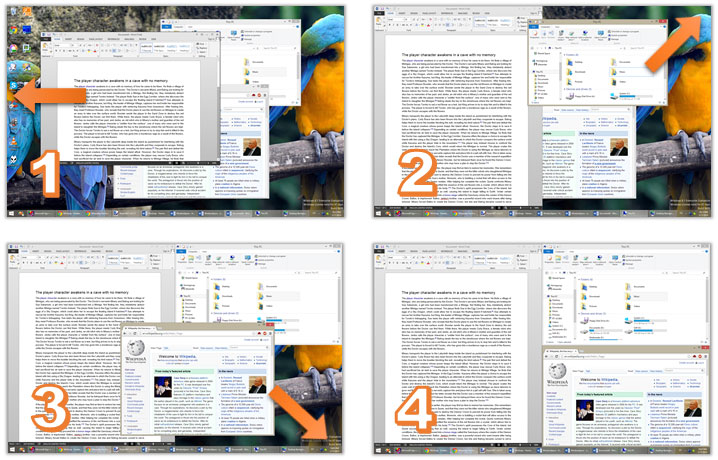
You can turn on or off this feature in the Settings on the Moving & Resizing tab. The option is called “Move window to one fourth of the screen when touching the corners (Snap-To-Corners)”.
Move and Resize Windows with the Keyboard
By default, you can resize windows and drag them over the desktop with the mouse. After installing WindowSpace, you’ll be able to do the same by using a set of keyboard shortcuts. This is a great alternative for laptop users and everyone who likes keeping hands on the keyboard.
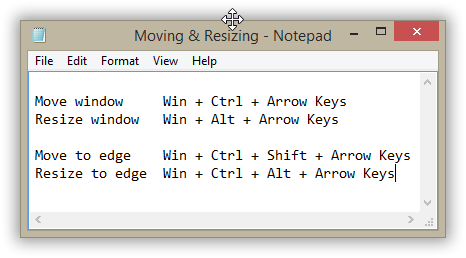
By pressing Win + Ctrl + Arrow Keys, you can move the active window to the left - right and up - down. To change the width or height of the window, press Win + Alt + Arrow Keys several times until the desired window size is achieved.
Set Windows “Always On Top”
The “Always On Top” option is a real helper when you multitask in several applications. It lets you pin a window on top of the other window and work with them both simultaneously, without the need to jump from one window to another.
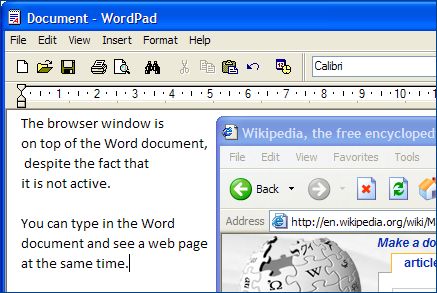
With this option in place, you can, for example, put a web browser on top of the word processing document and conveniently move data between the two applications.
WindowSpace adds the “Always On Top” option to the window menu. This menu appears when you right-click the window title bar or the application taskbar button.
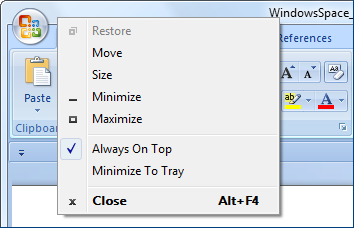
The availability and position of the new options in the window menu can be customized in the WindowSpace Settings dialog.
Minimize to Tray + Hide Window
These two options are clever alternatives to standard Windows minimization. The taskbar is fine for a few windows. But if you open many of them, it becomes cluttered, making it difficult to find a window. With WindowSpace, you’ll get two amazing ways to get rid of this problem. Simply minimize a window to the tray or hide it from view.
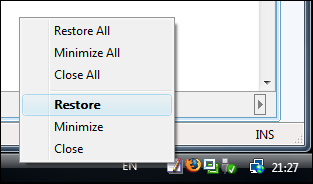
Right-click the icon to restore a hidden window
Minimization to tray is helpful when you want some applications – Outlook Express, Firefox, Internet Explorer – to run in the background and keep the taskbar free for more important programs you’re working with at the moment.
WindowSpace adds new “Minimize to Tray” and “Hide Window” actions to the standard window buttons. You can quickly minimize a window to the tray or hide it completely from view with a right-click or a middle-click on the Minimize button.
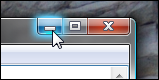
Right-click to 'Minimize To Tray',
or middle-click to 'Hide Window'
The “Hide Window” feature will benefit those who need to hide a document, MySpace page, photo album, or instant messenger quickly when someone – the boss or parent – comes into the room to check what’s going on.
Cascade, Tile and Close All Windows
In just one press of the hotkey, you can tile windows vertically or horizontally, cascade, or close them all. These options work in much the same way as the standard Windows shortcut – Win + D, which minimizes all open windows to the taskbar.
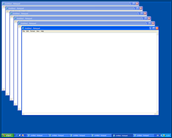
Cascade windows |

Tile windows vertically |
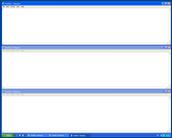
Tile windows horizontally |
To tile windows vertically, for example, you should press Win + V. The first key press arranges all open windows side by side; the second press on the same hotkey brings windows back to their initial positions. Press Win + Ctrl + Alt + F4 to quickly close all open windows and clean up the desktop workspace for a new task.
WindowSpace_2.6.3-setup.exe (0.5 MB)
Updated on 13-Oct-2020, see what's new →
$19.95 or less, lifetime license
FREE updates for life, NOT a subscription!
WindowSpace runs on all versions of Windows from Windows XP to Windows 11. It supports UAC elevated applications and works correctly on high-DPI displays. Native 64-bit version is included in the setup package and installed automatically.
|
Never miss when a new version comes out! Subscribe to updates → |

|