| View previous topic :: View next topic |
| Author |
Message |
Alexander Site Admin
Joined: 07 Apr 2005 Posts: 1126
|
Posted: Tue Mar 31, 2009 10:25 am Post subject: WindowSpace 2.0 Beta\Preview Version - NEW!!! |
|
|
Hello everyone,
I am glad to inform you that WindowSpace v2.0 Beta is ready for tests. Here is the list of the most noticeable improvements:
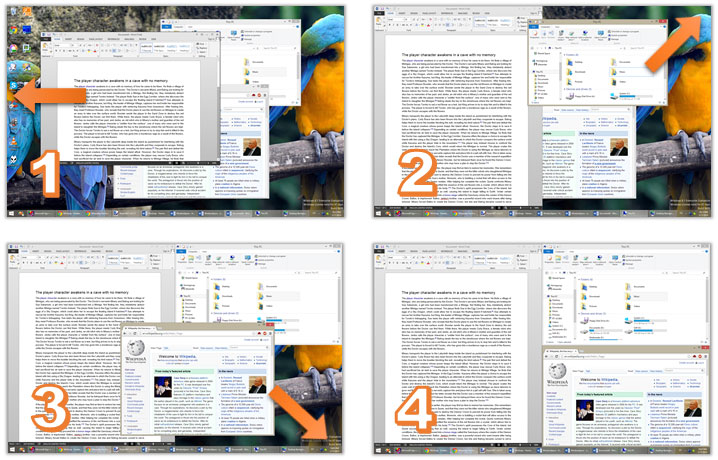
Snap-To-Side (similar to the new Aero Snap feature in Windows 7)
Resizing to the edge:
Unsnapping window from the edge, restores its original size. As in the previous version of WindowSpace, you can also right-click the Maximize button to do this.
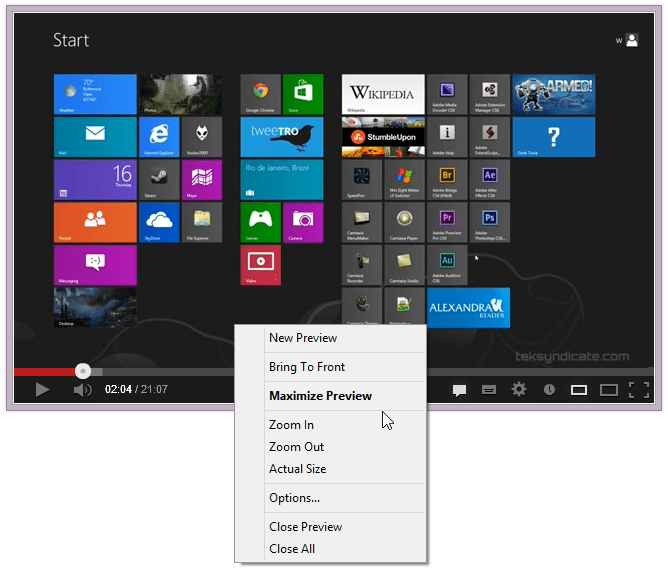
Roll Up / Unroll windows
Updated menu commands
20+ hotkeys to manage windows
Snap windows to grid lines
| Quote: | Changelog for v2.0.2 (April 22, 2009):
First native 64-bit version of WindowSpace 2.0 for Vista x64 and XP x64
Several improvements on Snap-To-Side feature (AeroSnap in Win7)
Move window to one fourth of the screen when touching the edge corners
Various stability and performance improvements |
| Quote: | Changelog for v2.0.3 beta (April 28, 2009):
Now WS runs with "UI Access" integrity level under Vista (UAC compatible)
"Roll Up" command added to Right-Click and Middle-Click mouse actions
Several improvements on Snap-To-Side and Snap-To-Corner animation
Fixed an issue with Snap-To-Side feauture for "topmost" windows
Some other minor improvements and bugfixes |
| Quote: | Changelog for v2.0.4 (May 21, 2009):
WindowSpace 2.0 is out of Beta phase!
Added support of third-party translations (see "lang" directory)
Added option to disable keyboard shortcuts (Hotkeys tab, Options)
Added ability to exclude certain applications via registry key (see forum)
Improved compatibility with applications that use their own snapping hooks
Fixed an issue when "Show window contents while dragging" is turned off
Fixed a minor issue with default keyboard shortcuts
Fixed a minor issue with "maximize to desktop" hotkey on Vista x64
Some default settings were changed
|
WindowSpace 2.0 is out of Beta phase!
Download WindowSpace v2.0.4 (32-bit)
http://www.ntwind.com/download/WindowSpace_2.0.4.exe
Download WindowSpace v2.0.4 (64-bit)
http://www.ntwind.com/download/WindowSpace_2.0.4-x64.exe
Subscribe to Updates (email or RSS)
Last edited by Alexander on Thu May 21, 2009 3:47 am; edited 6 times in total |
|
| Back to top |
|
 |
LuckMan212
Joined: 16 Apr 2005 Posts: 81
|
Posted: Wed Apr 08, 2009 7:31 pm Post subject: |
|
|
| where is x64 version? |
|
| Back to top |
|
 |
Alexander Site Admin
Joined: 07 Apr 2005 Posts: 1126
|
Posted: Wed Apr 08, 2009 7:45 pm Post subject: |
|
|
I need to re-write some code to make it to work on 64-bit OS's.
It will take more time than I expected.. hope it will be done the next week. |
|
| Back to top |
|
 |
LuckMan212
Joined: 16 Apr 2005 Posts: 81
|
Posted: Mon Apr 20, 2009 1:17 pm Post subject: |
|
|
i dont want to nag you Alex,
but any news on x64 yet? nudge nudge |
|
| Back to top |
|
 |
Alexander Site Admin
Joined: 07 Apr 2005 Posts: 1126
|
Posted: Wed Apr 22, 2009 12:25 am Post subject: |
|
|
It is almost done.. it should be released tomorrow (or the day after tomorrow).
"beta 2" + 64-bit version |
|
| Back to top |
|
 |
LuckMan212
Joined: 16 Apr 2005 Posts: 81
|
Posted: Wed Apr 22, 2009 11:07 am Post subject: |
|
|
| ahh great news! thank you alex |
|
| Back to top |
|
 |
Alexander Site Admin
Joined: 07 Apr 2005 Posts: 1126
|
Posted: Wed Apr 22, 2009 7:17 pm Post subject: |
|
|
WindowSpace 2.0.2 Beta, new features:
Snap-To-Corners (currently it is called "Move window to one fourth of the screen when touching the edge corners", Settings -> Moving & Resizing page)
As for "Snap-To-Side" and "Maximize Vertically", unsnapping window from the edge restores its original size.
This beta introduces some significant core improvements which should increase the work stability and system reliability. I invite everyone to test WindowSpace v2.0 Beta on as wide variety of system configurations as possible.
Last edited by Alexander on Thu Apr 30, 2009 12:37 am; edited 2 times in total |
|
| Back to top |
|
 |
LuckMan212
Joined: 16 Apr 2005 Posts: 81
|
Posted: Wed Apr 22, 2009 10:42 pm Post subject: |
|
|
hi Alex,
thank you for your work to release the x64 version!!
I've installed it and so far so good. Working very well.
Two questions:
1) can we please have a "maximize horiz+vert" in one hotkey? Right now to size a window to fill the entire monitor, I have to combine 2 keypresses-- this is a waste. We talked about this before....
2) any way for Windowspace to show its menu on "privileged" apps (those that run as "Administrator" on Vista)
thanks!!  |
|
| Back to top |
|
 |
Alexander Site Admin
Joined: 07 Apr 2005 Posts: 1126
|
Posted: Thu Apr 23, 2009 12:01 am Post subject: |
|
|
| LuckMan212 wrote: | | 1) can we please have a "maximize horiz+vert" in one hotkey? Right now to size a window to fill the entire monitor, I have to combine 2 keypresses-- this is a waste. We talked about this before.... |
- check out "Maximize to the desktop" hotkey
- also you can set the top-side action to "Maximize"
| LuckMan212 wrote: | | 2) any way for Windowspace to show its menu on "privileged" apps (those that run as "Administrator" on Vista) |
This should be fixed in one of the next 2.0 releases. |
|
| Back to top |
|
 |
krkaem
Joined: 26 Mar 2009 Posts: 17
|
Posted: Thu Apr 23, 2009 11:52 am Post subject: |
|
|
@ Alexander
Chapeau !!! It is worth EACH cent! |
|
| Back to top |
|
 |
LuckMan212
Joined: 16 Apr 2005 Posts: 81
|
Posted: Thu Apr 23, 2009 11:56 am Post subject: |
|
|
| Alexander wrote: | | check out "Maximize to the desktop" hotkey | perfect! didn't see it before...
| Quote: | any way for Windowspace to show its menu on "privileged" apps (those that run as "Administrator" on Vista) .....
This should be fixed in one of the next 2.0 releases. | amazing!! I look forward to it |
|
| Back to top |
|
 |
Alexander Site Admin
Joined: 07 Apr 2005 Posts: 1126
|
Posted: Thu Apr 23, 2009 12:11 pm Post subject: |
|
|
| LuckMan212 wrote: | | Alexander wrote: | | check out "Maximize to the desktop" hotkey | perfect! didn't see it before... |
Probably the most noticeable update is that dragging a "maxmized" window away from the edge restores the original window size.
P.S.
I'll rename this hotkey to "Maximize to the current monitor" in the next release. |
|
| Back to top |
|
 |
beau
Joined: 23 Mar 2009 Posts: 4
|
Posted: Mon Apr 27, 2009 1:09 pm Post subject: |
|
|
Bug(?) on 2.0.2 64bit version.
Windowspace settings windows seems to be a bit lag..when I click on "x" to close the windows, it lags for about half a sec before it disappeared. This didn't happen with 1.0.6 version.
Also can "roll up" be activated via titlebar buttons?
Other than that, great work!! Looking forward for the final release.
Beau |
|
| Back to top |
|
 |
Alexander Site Admin
Joined: 07 Apr 2005 Posts: 1126
|
Posted: Mon Apr 27, 2009 3:58 pm Post subject: |
|
|
| beau wrote: | Bug(?) on 2.0.2 64bit version.
Windowspace settings windows seems to be a bit lag..when I click on "x" to close the windows, it lags for about half a sec before it disappeared. This didn't happen with 1.0.6 version. |
What OS are you running? Windows XP x64?
| beau wrote: | | Also can "roll up" be activated via titlebar buttons? |
..added to the next release. |
|
| Back to top |
|
 |
LuckMan212
Joined: 16 Apr 2005 Posts: 81
|
Posted: Mon Apr 27, 2009 4:14 pm Post subject: |
|
|
so far v2.02 is really working great for me on vista x64.
I am definitely looking forward to being able to use window space features with apps that are running with elevated (UAC) status. Alex, I saw you mentioned that in the next release hopefully this will be possible. So I am hoping to test that feature as soon as it is ready, because I do use a lot of apps that are running 'as administrator'  |
|
| Back to top |
|
 |
|